Add in-line CSS into the HTML code below to make the output look
similar to B.
<form method="POST" enctype="multipart/form-data"
action="{% url 'upload' %}">
{% csrf_token
%}
<input
type='file' name='document' accept='.csv'
required><br>
<label
for='axis'>Which column is the
x-axis?<label><br>
<input
type='number' name='axis' id='axis' required placeholder='Set
X-axis'><br>
<label
for='columns'> Which columns do you want to
graph?</label><br>
<input
type='text' name='columns' id='columns' required
placeholder='Columns (separated by spaces)'
size='30'><br>
<button
type='submit' name='csvreader' class="action-btn">Bar
Graph</button>
<button
type='submit' name='line_plot' class="action-btn">Line
Graph</button>
<button
type='submit' name='scatter_plot' class="action-btn">Scatter
Plot</button>
</form>
A.
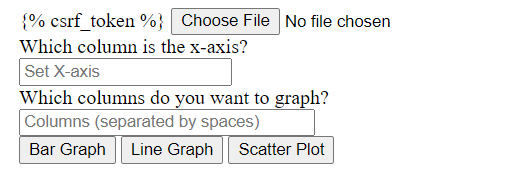
- Add In Line Css Into The Html Code Below To Make The Output Look Similar To B Form Method Post Enctype Multipart Fo 1 (13.43 KiB) Viewed 41 times
B.
{% csrf_token% Choose File No file chosen Which column is the x-axis? Set X-axis Which columns do you want to graph? Columns (separated by spaces) Bar Graph Line Graph Scatter Plot
Choose File What Column is the X-axis? ] Which column do you want to graph?