Page 1 of 1
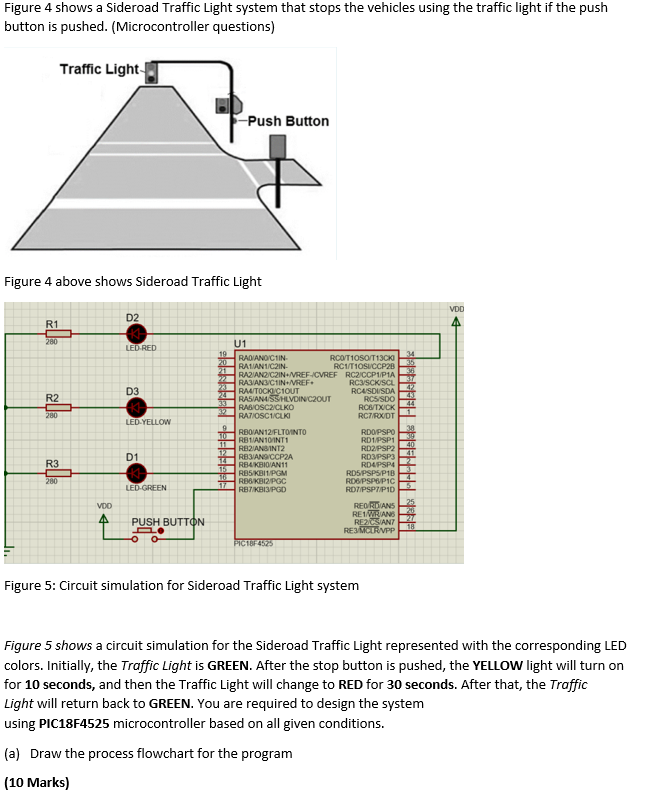
Figure 4 shows a Sideroad Traffic Light system that stops the vehicles using the traffic light if the push button is pus
Posted: Fri Apr 29, 2022 9:10 am
by answerhappygod
- Figure 4 Shows A Sideroad Traffic Light System That Stops The Vehicles Using The Traffic Light If The Push Button Is Pus 1 (164.11 KiB) Viewed 20 times
Figure 4 shows a Sideroad Traffic Light system that stops the vehicles using the traffic light if the push button is pushed. (Microcontroller questions) Traffic Light Push Button Figure 4 above shows Sideroad Traffic Light VDD D2 R1 280 LED RED 35 35 7 D3 R2 44 280 LED-YELLOW U1 19 RADIANO CHIN 20 RCO/T10SO/T1300 21 RALIAN1/C2IN RC1/10SUCCP2B RAZIANOC2IN.IVREF-ICVREF RCCCP1P1A 22 RASIAN3/C1IN+IVREF. 22 RCSCKISCL 22 RAUTOCKICIOUT RCUISDISDA 33 RASIAN/SS/HLVDIN CZOUT RCS/SDO RABIOSC2/CLKO RCGTXICK RATIOSC1/CLKI RC/RXDT 9 10 RBOIAN12/FLTO INTO RDO/PSPO RBIAN10/INT1 RD1PSP1 RB21ANSINT2 RD2/PSP2 12 RBSANS CCP2A RD3/PSP3 RB4KBIDAN11 RD4PSP 115 RB5 KBI/PGM RD5 PSPS/P1B 17 RB6/KBI2PGC RDGPSPOPIC EH EH13PGD ROTIPSPT/P10 REORDANS RE1 WRANS RE2 CSIANT RECRUPP PIC18F455 40 D1 R3 280 LED-GREEN VOD A Zumbi PUSH BUTTON 18 Figure 5: Circuit simulation for Sideroad Traffic Light system Figure 5 shows a circuit simulation for the Sideroad Traffic Light represented with the corresponding LED colors. Initially, the Traffic Light is GREEN. After the stop button is pushed, the YELLOW light will turn on for 10 seconds, and then the Traffic Light will change to RED for 30 seconds. After that, the Traffic Light will return back to GREEN. You are required to design the system using PIC18F4525 microcontroller based on all given conditions. (a) Draw the process flowchart for the program (10 Marks)