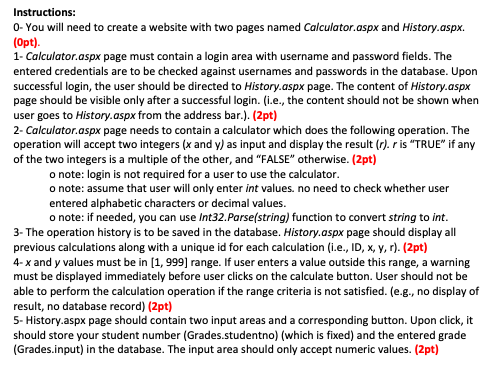
- Instructions O You Will Need To Create A Website With Two Pages Named Calculator Aspx And History Aspx Opt 1 Calcu 1 (56.22 KiB) Viewed 223 times
Instructions: O-You will need to create a website with two pages named Calculator.aspx and History.aspx. (Opt). 1- Calculator.aspx page must contain a login area with username and password fields. The entered credentials are to be checked against usernames and passwords in the database. Upon successful login, the user should be directed to History.aspx page. The content of History.aspx page should be visible only after a successful login. (i.e., the content should not be shown when user goes to History.aspx from the address bar.). (2pt) 2- Calculator.aspx page needs to contain a calculator which does the following operation. The operation will accept two integers (x and y) as input and display the result (r). r is "TRUE" if any of the two integers is a multiple of the other, and "FALSE" otherwise. (2pt) o note: login is not required for a user to use the calculator. o note: assume that user will only enter int values. no need to check whether user entered alphabetic characters or decimal values. o note: if needed, you can use Int32.Parse(string) function to convert string to int. 3- The operation history is to be saved in the database. History.aspx page should display all previous calculations along with a unique id for each calculation (i.e., ID, x,y,r). (2pt) 4-x and y values must be in (1,999) range. If user enters a value outside this range, a warning must be displayed immediately before user clicks on the calculate button. User should not be able to perform the calculation operation if the range criteria is not satisfied. (e.g., no display of result, no database record) (2pt) 5- History.aspx page should contain two input areas and a corresponding button. Upon click, it should store your student number (Grades.studentno) (which is fixed) and the entered grade (Grades.input) in the database. The input area should only accept numeric values. (2pt)
Database Specifications: It is very important that you carefully design your database with the same server, database, table, column etc. names as shown here. You will have to use these tables and only these tables) to store and retrieve data. Object Explorer Connect *** YO ENSI0A8ED415543F\SQLEXPRESS (SQL Server 15.0.2000 - NS10ASED418F43P Administrator) Databases System Databases Database Snapshots Lab Bassignment Database Diagrams B Tables System Tables FileTables External Tables Graph Tables dbo. Grades Columns studentno (nvarchar(50), net null) input (nvarchar(50), not null Keys Constraints Triggers Indexes Statistics dbo. History Columns Id (PK int not null) xlint not null) yoint, not null Inchar(10), not null) Keys Constraints Triggers Indexes Statistics dbo.Users Columns username PK, nvarchar(50), not null password (nvarchar(50), net null Keys Constraints