Page 1 of 1
Turn on the smart timer and select Time and Stopwatch mode if it isn't already selected. Press she star button. The smar
Posted: Mon Jul 18, 2022 6:02 am
by answerhappygod
- Turn On The Smart Timer And Select Time And Stopwatch Mode If It Isn T Already Selected Press She Star Button The Smar 1 (328.03 KiB) Viewed 39 times
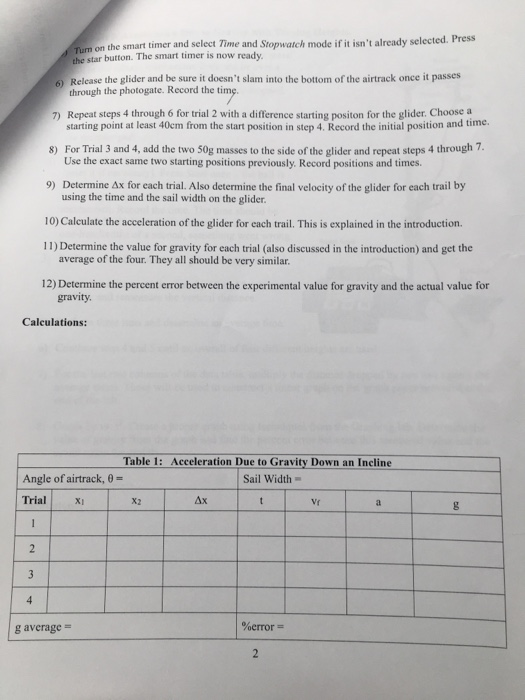
Turn on the smart timer and select Time and Stopwatch mode if it isn't already selected. Press she star button. The smart timer is now ready 6) Release the glider and be sure it doesn't slam into the bottom of the airtrack once it passes through the photogate. Record the time 7) Repeat steps 4 through 6 for trial 2 with a difference starting positon for the glider. Choose a starting point at least 40cm from the start position in step 4. Record the initial position and time. 8) For Trial 3 and 4, add the two 50g masses to the side of the glider and repeat steps 4 through 7. Use the exact same two starting positions previously. Record positions and times. 9) Determine Ax for each trial. Also determine the final velocity of the glider for each trail by using the time and the sail width on the glider. 10) Calculate the acceleration of the glider for each trail. This is explained in the introduction. 11) Determine the value for gravity for each trial (also discussed in the introduction) and get the average of the four. They all should be very similar 12) Determine the percent error between the experimental value for gravity and the actual value for gravity Calculations: Table 1: Acceleration Due to Gravity Down an Incline Angle of airtrack, 0 - Sail Width Trial x x 4x I V g average - %error =