Page 1 of 1
Question 2: SNAP! Programming For this question, you will write SNAP! programs. To hand in your answers, you will use th
Posted: Thu Jul 14, 2022 2:12 pm
by answerhappygod
- Question 2 Snap Programming For This Question You Will Write Snap Programs To Hand In Your Answers You Will Use Th 1 (79.37 KiB) Viewed 35 times
- Question 2 Snap Programming For This Question You Will Write Snap Programs To Hand In Your Answers You Will Use Th 2 (34.35 KiB) Viewed 35 times
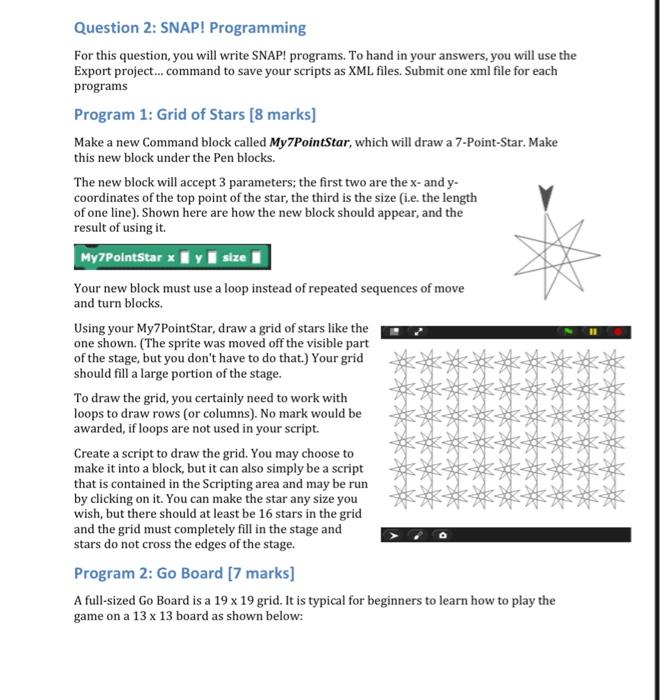
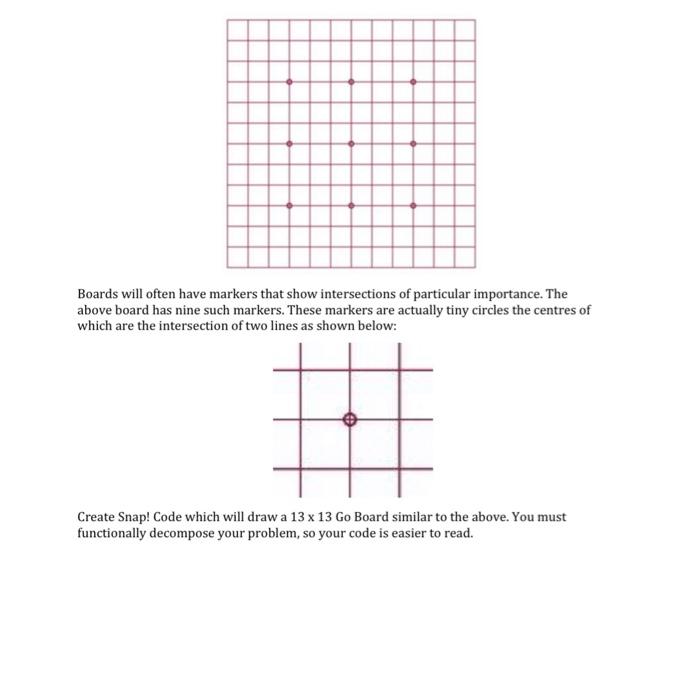
Question 2: SNAP! Programming For this question, you will write SNAP! programs. To hand in your answers, you will use the Export project... command to save your scripts as XML files. Submit one xml file for each programs Program 1: Grid of Stars [8 marks] Make a new Command block called My7PointStar, which will draw a 7-Point-Star. Make this new block under the Pen blocks. The new block will accept 3 parameters; the first two are the x - and y coordinates of the top point of the star, the third is the size (i.e. the length of one line). Shown here are how the new block should appear, and the result of using it. Your new block must use a loop instead of repeated sequences of move and turn blocks. Using your My7PointStar, draw a grid of stars like the one shown. (The sprite was moved off the visible part of the stage, but you don't have to do that.) Your grid should fill a large portion of the stage. To draw the grid, you certainly need to work with loops to draw rows (or columns). No mark would be awarded, if loops are not used in your script. Create a script to draw the grid. You may choose to make it into a block, but it can also simply be a script that is contained in the Scripting area and may be run by clicking on it. You can make the star any size you wish, but there should at least be 16 stars in the grid and the grid must completely fill in the stage and stars do not cross the edges of the stage. Program 2: Go Board [7 marks] A full-sized Go Board is a 19×19 grid. It is typical for beginners to learn how to play the game on a 13×13 board as shown below:
Boards will often have markers that show intersections of particular importance. The above board has nine such markers. These markers are actually tiny circles the centres of which are the intersection of two lines as shown below: Create Snap! Code which will draw a 13×13 Go Board similar to the above. You must functionally decompose your problem, so your code is easier to read.