Page 1 of 1
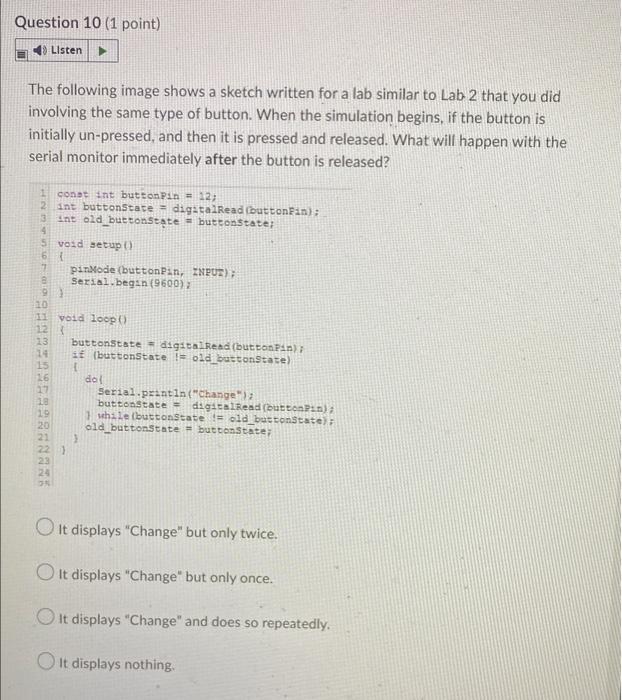
Question 10 (1 point) Listen The following image shows a sketch written for a lab similar to Lab 2 that you did involvin
Posted: Mon May 16, 2022 6:37 am
by answerhappygod
- Question 10 1 Point Listen The Following Image Shows A Sketch Written For A Lab Similar To Lab 2 That You Did Involvin 1 (73.04 KiB) Viewed 53 times
- Question 10 1 Point Listen The Following Image Shows A Sketch Written For A Lab Similar To Lab 2 That You Did Involvin 2 (42.02 KiB) Viewed 53 times
Question 10 (1 point) Listen The following image shows a sketch written for a lab similar to Lab 2 that you did involving the same type of button. When the simulation begins, if the button is initially un-pressed, and then it is pressed and released. What will happen with the serial monitor immediately after the button is released? const int button Pin = 12; 2 int buttonState - digitalRead buttonFin): int old_buttonstate - buttonstate; void setup 6 pinMode(button Pan, ZNPUT); e Serial.begin(9600); 9 10 void loop 12 13 buttonstate digitalRead(buttonpin) 14 € (buttonState != old_buttonState) 15 16 dal 17 Serial.println("Change"); 20 buttonstate = digitalRead(buttons): 19 1 while button State = old buttonstate) old buttonState = buttonState: 21 24 O It displays "Change" but only twice. It displays "Change" but only once. It displays "Change" and does so repeatedly. It displays nothing
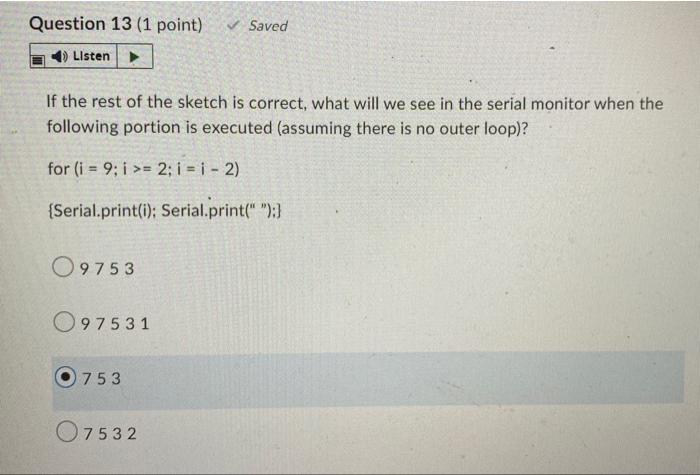
Question 13 (1 point) ✓ Saved Listen If the rest of the sketch is correct, what will we see in the serial monitor when the following portion is executed (assuming there is no outer loop)? for (i = 9; i >= 2; i = 1 - 2) {Serial.print(i): Serial.print(" ");} 09753 097531 753 07532