Page 1 of 1
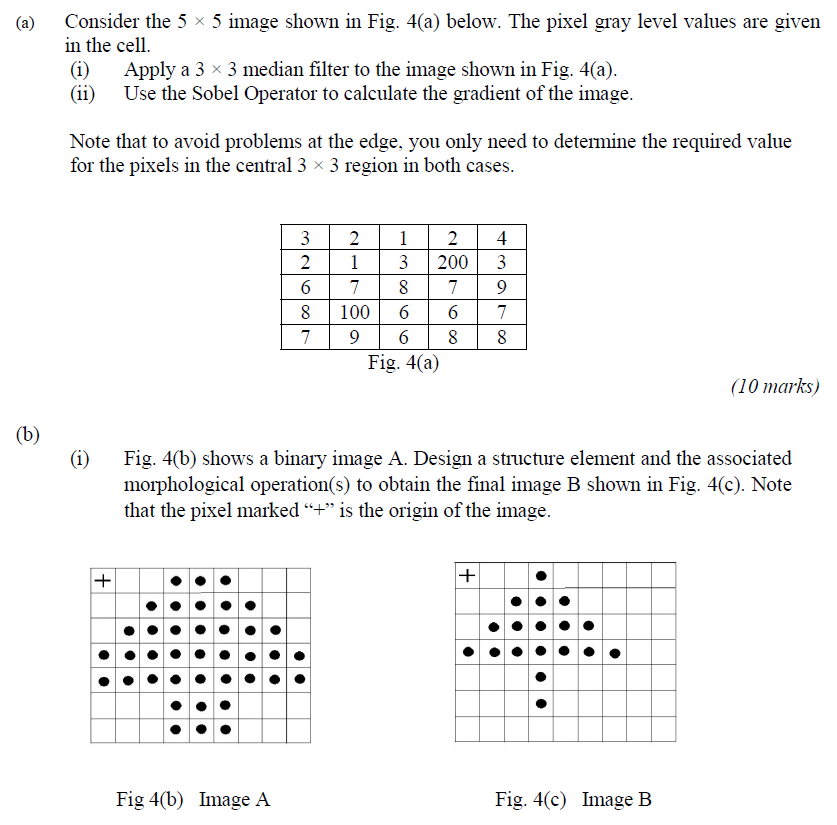
(a) Consider the 5 × 5 image shown in Fig. 4(a) below. The pixel gray level values are given in the cell. (1) Apply a 3
Posted: Thu May 05, 2022 5:32 pm
by answerhappygod
- A Consider The 5 5 Image Shown In Fig 4 A Below The Pixel Gray Level Values Are Given In The Cell 1 Apply A 3 1 (85.56 KiB) Viewed 30 times
(a) Consider the 5 × 5 image shown in Fig. 4(a) below. The pixel gray level values are given in the cell. (1) Apply a 3 x 3 median filter to the image shown in Fig. 4(a). Use the Sobel Operator to calculate the gradient of the image. (ii) Note that to avoid problems at the edge, you only need to determine the required value for the pixels in the central 3 × 3 region in both cases. 3 2 1 2 4 2 1 3 200 3 6 7 8 7 9 6 6 7 7 6 8 8 Fig. 4(a) (10 marks) (b) (1) Fig. 4(b) shows a binary image A. Design a structure element and the associated morphological operation(s) to obtain the final image B shown in Fig. 4(c). Note that the pixel marked “+” is the origin of the image. + + Fig 4(b) Image A Fig. 4(c) Image B 687 100 9
(11) Figure 4(d) is a binary image C, and Fig. 4(e) is a structure element. Show the result of opening the Image C by the structure element X. Note that the pixel marked “+” is the origin of the image. + Fig. 4(e) Structure element X ● Fig. 4(d) Image C (15 marks)