- Excel Portfolio Assignment Description The Purpose Of This Assignment Is To Demonstrate That You Can Effectively Use Ex 1 (56.44 KiB) Viewed 29 times
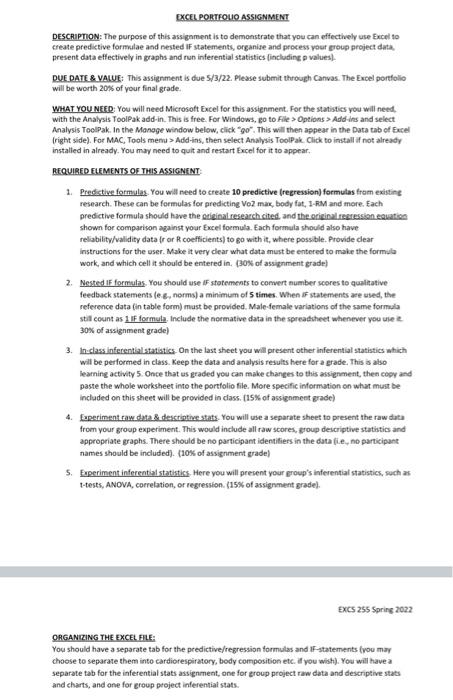
EXCEL PORTFOLIO ASSIGNMENT DESCRIPTION: The purpose of this assignment is to demonstrate that you can effectively use Excel to create predictive formulae and nested IF statements, organize and process your group project data present data effectively in graphs and run inferential statistics (including p values). DUE DATE & VALUE: This assignment is due 5/3/22. Please submit through Canvas. The Excel portfolio will be worth 20% of your final grade. WHAT YOU NEED: You will need Microsoft Excel for this assignment. For the statistics you will need, with the Analysis ToolPak add-in. This is free. For Windows, go to File > Options> Add-ins and select Analysis ToolPak. In the Manage window below, click "go". This will then appear in the Data tab of Excel (right side). For MAC, Tools menu > Add-ins, then select Analysis ToolPak Click to install if not already installed in already. You may need to quit and restart Excel for it to appear. REQUIRED ELEMENTS OF THIS ASSIGNENT 1. Predictive formulas. You will need to create 10 predictive (regression) formulas from existing research. These can be formulas for predicting Vo2 max, body fat, 1-RM and more. Each predictive formula should have the original research cited, and the original regression equation shown for comparison against your Excel formula. Each formula should also have reliability/validity data (r or R coefficients) to go with it, where possible. Provide clear instructions for the user. Make it very clear what data must be entered to make the formula work, and which cell it should be entered in. (30% of assignment grade) 2. Nested IF formulas. You should use IF statements to convert number scores to qualitative feedback statements (eg, norms) a minimum of 5 times. When IF statements are used, the reference data (in table form) must be provided. Male-female variations of the same formula still count as 1 IF formula. Include the normative data in the spreadsheet whenever you use t 30% of assignment grade) 3. In-class inferential statistics. On the last sheet you will present other inferential statistics which will be performed in class. Keep the data and analysis results here for a grade. This is also learning activity 5. Once that us graded you can make changes to this assignment, then copy and paste the whole worksheet into the portfolio file. More specific information on what must be included on this sheet will be provided in class. (15% of assignment grade) 4. Experiment raw data & descriptive stats. You will use a separate sheet to present the raw data from your group experiment. This would include all raw scores, group descriptive statistics and appropriate graphs. There should be no participant identifiers in the data (ie, no participant names should be included). (10% of assignment grade) 5. Experiment inferential statistics. Here you will present your group's inferential statistics, such as t-tests, ANOVA, correlation, or regression. (15% of assignment grade). EXCS 255 Spring 2022 ORGANIZING THE EXCEL FILE: You should have a separate tab for the predictive/regression formulas and IF-statements (you may choose to separate them into cardiorespiratory, body composition etc. if you wish). You will have a separate tab for the inferential stats assignment, one for group project raw data and descriptive stats and charts, and one for group project inferential stats.