Page 1 of 1
Question 2: Generate sensitivity analysis and answer report using Excel solver. Question 3: Use the below sensitivity re
Posted: Mon May 02, 2022 12:46 pm
by answerhappygod
- Question 2 Generate Sensitivity Analysis And Answer Report Using Excel Solver Question 3 Use The Below Sensitivity Re 1 (49.26 KiB) Viewed 31 times
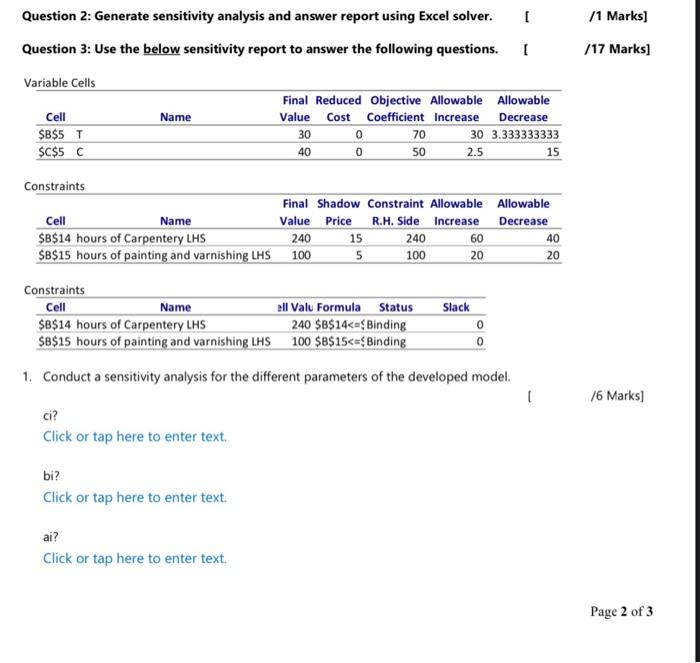
Question 2: Generate sensitivity analysis and answer report using Excel solver. Question 3: Use the below sensitivity report to answer the following questions. /1 Marks) /17 Marks] [ Variable Cells Name Cell $B$5 T $C$ 5C Final Reduced Objective Allowable Allowable Value Cost Coefficient Increase Decrease 30 0 70 30 3.333333333 0 50 2.5 15 40 Constraints Final Shadow Constraint Allowable Allowable Cell Name Value Price R.H. Side Increase Decrease $B$14 hours of Carpentery LHS 240 15 240 60 40 $B$15 hours of painting and varnishing LHS 100 5 20 20 100 Slack Constraints Cell Name all Valu Formula Status $B$14 hours of Carpentery LHS 240 $B$14<=<Binding $B$15 hours of painting and varnishing LHS 100 $B$15<=<Binding 0 0 1. Conduct a sensitivity analysis for the different parameters of the developed model [ /6 Marks) ci? Click or tap here to enter text. bi? Click or tap here to enter text. ai? Click or tap here to enter text. Page 2 of 3